AI-first · credentials encrypted locally

Let an AI Agent
run your servers

SSH terminal · dangerous-command blocking · AI inspection · MCP server

macOS UniversalWindows x64EN / 中文MIT License
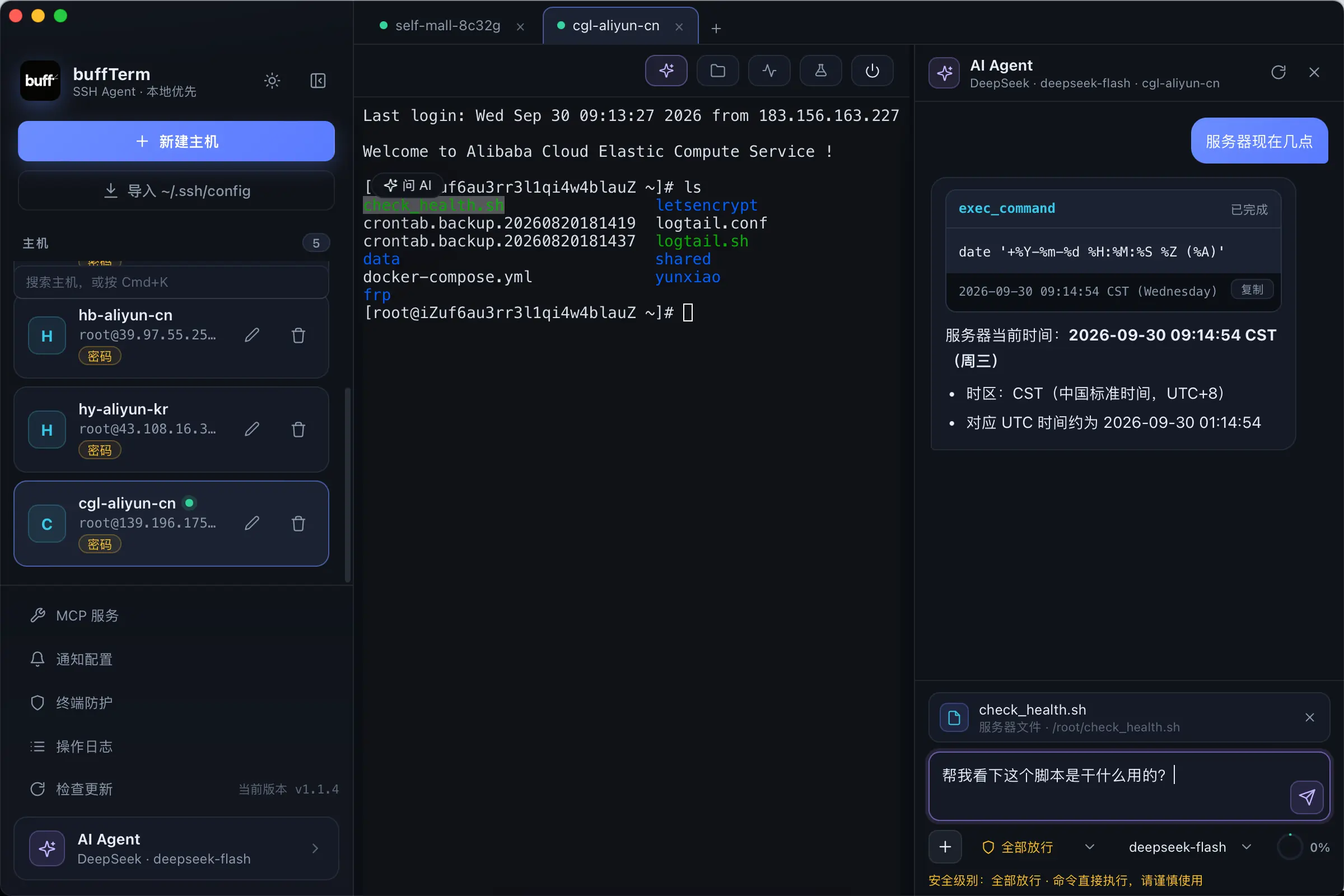
buffTerm AI Agent chat Tap to zoom
9Core capability modules
90Days of metric history
3Security approval levels
0Credentials stored in the cloud
CAPABILITIES

One terminal to run your fleet

A self-built AI agent orchestration layer plus protocol-level SSH — the AI and its safety controls live inside the app, with no third-party agent framework.

🧠

Self-built AI Agent

A hand-written agent orchestration layer with no framework dependency: SSE streaming, the tool-calling loop, approval interception and audit trails are all under our control.

  • exec / read / inspection / trend analysis
  • Three security levels + custom rules
🔌

MCP server

Expose selected hosts to Codex / Claude Desktop. Streamable HTTP with token auth and three permission modes: read-only, guarded, allow-all.

  • Host-parameterized tool set
  • Listens on 127.0.0.1 only, tokens rotatable
🔍

AI inspection & remediation

Read-only baseline collection with a Chinese / English report (including malware and cryptomining checks); confirmed remediation steps run automatically, fully audited and emailed.

  • Dynamic command allowlist keeps it read-only
  • Steps are editable and retryable
📈

Monitoring & trends

CPU / memory / disk / load dashboards with up to 90 days of history; linear regression estimates growth and days-to-threshold.

  • Auto-refresh every 5 seconds
  • Agent conversations collect trend data automatically
🛡

Dangerous-command blocking

Decisions come from the terminal's real command line, covering Tab completion, history replay and editing keys. Matching commands need confirmation before Enter.

  • Built-in + custom dangerous rules
  • Approve / clear line / auto-refocus
🔒

Encrypted credentials

Passwords and API keys are AES-256-GCM encrypted in SQLite with the master key in the system keychain — copying the database is not enough to decrypt them.

  • Private keys and API keys never enter the model context
  • macOS / Windows keychains
🌐

Bilingual UI (中文 / EN)

Switch Chinese / English from the sidebar with no restart. Labels, tooltips, dialogs, terminal messages, backend errors and emails all follow the language.

  • AI prompts and tool descriptions switch too
  • Inspection reports follow the current language
📁

SFTP & file editor

Structured SFTP browsing with an inline button that opens remote files in the built-in CodeMirror 6 editor and saves them straight back.

  • Batch upload: multi-select, concurrency, one conflict summary
  • Atomic saves that keep permissions; sensitive paths need confirmation
🖥

Multi-tab SSH sessions

Protocol-level SSH (russh) without shelling out to ssh / sftp; parallel tabs, per-host connection reuse and idle reclamation.

  • Password / key / encrypted key / ssh-agent
  • Host key verification on first connect, optional auto-reconnect
QUICK START

Three steps to hand your servers to AI

No new ops stack to learn: install, add a host, then describe the task in plain language.

01

Download & install

Choose the macOS or Windows installer. Builds are not signed or notarized yet: on Windows pick More info → Run anyway in SmartScreen, on macOS right-click the app and choose Open.

02

Add a server

Use a password, private key, encrypted key or ssh-agent — or import ~/.ssh/config in one click.

03

Tell the AI what to do

Describe the goal in the host chat. Read-only commands run automatically; writes and dangerous commands need approval and are audited.

BUILT FOR
Personal / small-team servers Batch inspection & remediation SSH access for external AI tools (MCP)

“The disk is almost full. Find the largest directories and suggest what to clean up.”

“Inspect this server: check for suspicious processes, login records and open ports.”

“Upgrade nginx to the latest stable release. Explain the risks and rollback plan first.”

MCP SERVER

Connect hosts to Claude Desktop / Codex

Enable the MCP server, pick the hosts to expose and choose a permission mode. It listens on 127.0.0.1 only, and tokens can be rotated at any time.

Read the MCP setup doc →
MCP client config
{
  "mcpServers": {
    "buffterm-ssh": {
      "type": "http",
      "url": "http://127.0.0.1:48123/mcp",
      "headers": { "Authorization": "Bearer <token>" }
    }
  }
}

Use the config generated by the MCP service dialog in the app.

SCREENSHOTS

See it in action

Real screenshots — interactions and the dark theme at a glance.

AI Agent chat
AI Agent chat
SECURITY & DATA BOUNDARY

Credentials stay local. AI actions have boundaries.

Before handing SSH to an AI, be clear about where data goes and who can run what.

🔐

Credentials encrypted locally

SSH passwords, key passphrases, AI API keys, MCP tokens and SMTP passwords are AES-256-GCM encrypted in local SQLite; the master key lives in the system keychain.

📡

Clear data boundary

Config, credentials and audit data stay on your machine. AI chats and inspection content are sent to the model provider you configure. Private keys and API keys never enter the model context.

🛡️

Approval and full audit

Read-only commands run automatically; writes, dangerous commands and custom rules need approval. Agent, MCP, terminal guard, file edits and remediation are all audited.

01Read-only runs automaticallyStatus, files and trends
02Writes & dangerous commands need approvalReview the exact command first
03Full audit trailHost, source, command and result
TECH STACK

Tech stack

Protocol-level SSH — no system ssh / sftp process involved.

Tauri 2Desktop framework · Rust backend
React 19TypeScript · xterm.js
russhProtocol-level SSH / SFTP
SQLiterusqlite · config / audit / encrypted credentials
keyringSystem keychain · master key
Self-built agentOpenAI-compatible · no framework
COMPATIBLE MODELS DeepSeek Qwen Kimi OpenAI Ollama Any OpenAI-compatible API
FAQ

Frequently asked questions

Direct answers about licensing, credentials and the data boundary.

Is buffTerm free?

Yes. buffTerm is open source under the MIT license; downloads are free. AI features require your own model API key.

Where are SSH credentials stored?

Locally in SQLite, encrypted with AES-256-GCM; the master key lives in the system keychain. Copying the database alone cannot decrypt them.

Does the AI see my password?

No. SSH passwords, key passphrases and API keys never enter the model context, and command output is sanitized for secrets before it is sent. AI chats and inspection content are sent to the model provider you configure.

Which models are supported?

Any OpenAI-compatible endpoint, including DeepSeek, Qwen, Kimi, OpenAI and local Ollama. Each provider can hold multiple models with their own context windows.

What if my system blocks the first launch?

Installers are not code-signed or Apple-notarized yet, so the warning is expected and does not mean the file is compromised. Windows: in SmartScreen choose More info → Run anyway. macOS: right-click the app → Open → Open; if it reports the app is damaged, run xattr -d com.apple.quarantine /Applications/buffTerm.app and reopen it. Credential encryption and local storage are unaffected.

Is Linux supported?

Official installers are available for macOS and Windows; no official Linux package is provided yet.

Does the MCP server expose anything to the internet?

No. It listens on 127.0.0.1 only, uses random token authentication, supports token rotation and three permission modes: read-only, guarded and allow-all.

CHANGELOG

Recent updates

The project is moving fast — these are the latest releases read from GitHub.

Ready to take over your servers?

Download buffTerm, connect your first host and let the AI start working.

Latest release from GitHub · macOS Universal DMG / Windows NSIS EXE

Installers are not code-signed or Apple-notarized yet: on SmartScreen choose More info → Run anyway, and on macOS right-click the app and choose Open. Credentials always stay encrypted on your machine.